Problem
Attaching an 8 TB Western Digital My Book external USB drive to
an older Linux system (Debian 11.5) doesn't work. No entries are
written to the logs, lsusb doesn't show it, and no
error messages on the screen. The Mybook runs perfectly and is
automatically mounted in Windows 7 but can't be mounted or formatted
in Linux. Newer systems might be able to read it but I didn't test that.
System
 Linux oxygen 5.10.0-33-amd64 #1 SMP Debian 5.10.226-1
(2024-10-03) x86_64 x86_64 x86_64 ooooLinux
lsusb says the system has USB 3.0, and the My Book
was plugged into a 'blue' port marked SS, but it still wasn't identified.
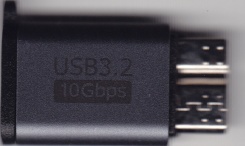
USB Adapter
Solution
1. Discard the Micro B to USB A cable that comes with the My Book.
2. Attach a Jadebones USB C to Micro B USB3.2 hard drive adapter to the MyBook.
3. Attach a USB C to USB A cable to the adapter and insert into a USB2 port on linux.
Linux now correctly identifies it and printed the following to
/var/log/messages:
kernel: [760159.816072] usb 2-4: new high-speed USB device number 2 using xhci_hcd

kernel: [760159.970745] usb 2-4: New USB device found, idVendor=1058, idProduct=25ee, bcdDevice=40.09

kernel: [760159.970751] usb 2-4: New USB device strings: Mfr=2, Product=3, SerialNumber=1

kernel: [760159.970754] usb 2-4: Product: My Book 25EE

kernel: [760159.970756] usb 2-4: Manufacturer: Western Digital

kernel: [760159.970759] usb 2-4: SerialNumber: 52443239454C5348

kernel: [760159.971570] usb-storage 2-4:1.0: USB Mass Storage device detected

kernel: [760159.974925] scsi host10: usb-storage 2-4:1.0

mtp-probe: checking bus 2, device 2: "/sys/devices/pci0000:00/0000:00:1c.7/0000:08:00.0/usb2/2-4"

mtp-probe: bus: 2, device: 2 was not an MTP device

mtp-probe: checking bus 2, device 2: "/sys/devices/pci0000:00/0000:00:1c.7/0000:08:00.0/usb2/2-4"

mtp-probe: bus: 2, device: 2 was not an MTP device

kernel: [760160.997598] scsi 10:0:0:0: Direct-Access     WD       My Book 25EE     4009 PQ: 0 ANSI: 6

kernel: [760160.998206] scsi 10:0:0:1: Enclosure         WD       SES Device       4009 PQ: 0 ANSI: 6

kernel: [760161.001073] sd 10:0:0:0: Attached scsi generic sg5 type 0

kernel: [760161.001176] scsi 10:0:0:1: Attached scsi generic sg6 type 13

kernel: [760161.003026] sd 10:0:0:0: [sde] Spinning up disk...

kernel: [760162.020041] .........ready

kernel: [760170.212520] sd 10:0:0:0: [sde] Very big device. Trying to use READ CAPACITY(16).

kernel: [760170.212770] sd 10:0:0:0: [sde] 15628052480 512-byte logical blocks: (8.00 TB/7.28 TiB)

kernel: [760170.212774] sd 10:0:0:0: [sde] 4096-byte physical blocks

kernel: [760170.213369] sd 10:0:0:0: [sde] Write Protect is off

kernel: [760170.329996]  sde: sde1

kernel: [760170.346367] sd 10:0:0:0: [sde] Attached SCSI disk

kernel: [760170.370725] ses 10:0:0:1: Attached Enclosure device

udisksd[693]: Error probing device: Error sending ATA command IDENTIFY DEVICE to '/dev/sde': Unexpected sense data returned:#0120000: f0 00 01 00  50 00 01 0a  80 00 00 00  00 1d 00 00    ....P...........#0120010: 00 00 00 00  00 00 00 00  00 00 00 00  00 00 00 00    ................#012 (g-io-error-quark, 0)
The drive can now be mounted as sde1 (on my system—other systems will name it differently):
mount /dev/sde1 /mnt

df

/dev/sde1      7813992448     10240 7813982208   1% /mnt
Copying files works, though it gives an error after each copy saying it is unable to preserve ownership for files not owned by root (Operation not permitted) presumably because the drive is pre-formatted with exFAT. This is annoying but harmless for backups. Most likely installing an ext4 filesystem on it would avoid this message.
may 22 2026